commit 5c5790718a8d8946a601b1d2f81a376e3830ee2c
Author: Joseph Crowell <joseph.w.crowell@gmail.com>
Date: Thu Dec 18 11:43:10 2025 +0000
diff --git a/docs/protocols/msteams/account.md b/docs/protocols/msteams/account.md
index bfb3855..c3430c8 100644
--- a/docs/protocols/msteams/account.md
+++ b/docs/protocols/msteams/account.md
@@ -577 +577 @@ Click on `New Registration` (top)
## Actually set permissions
-- Choose `graph API`
+- Choose `graph API`
- Choose `delegated permissions`
- Add `Group.Read.All`, `Group.ReadWrite.All` and `User.Read`. These permissions are needed for sending/reading chat messages in a channel.
- Add `Files.Read`, `Files.Read.All`, `Sites.Read.All`. These permissions are needed for reading the file attachments in messages.
@@ -1217 +1217 @@ Don't forget to click Save on top of the page
Click on overview, left upper link.
-You'll see 2 ID's, these are needed for the matterbridge configuration.
+You'll see 2 ID's, these are needed for the matterbridge configuration.
- Tenant ID
- Client ID
@@ -1697 +1697 @@ You should know have all the three ID's to configure matterbridge:
```toml
[msteams.teams]
-TenantID="xxxxxxxx-xxxx-xxxx-xxxx-xxxxxxxxxxxx"
+TenantID="xxxxxxxx-xxxx-xxxx-xxxx-xxxxxxxxxxxx"
ClientID="xxxxxxxx-xxxx-xxxx-xxxx-xxxxxxxxxxxx"
TeamID="xxxxxxxx-xxxx-xxxx-xxxx-xxxxxxxxxxxx"
RemoteNickFormat="[{PROTOCOL}] <{NICK}> "
@@ -2287 +2287 @@ Your `matterbridge.toml` file should contain:
```toml
[msteams.teams]
-TenantID="xxxxxxxx-xxxx-xxxx-xxxx-xxxxxxxxxxxx"
+TenantID="xxxxxxxx-xxxx-xxxx-xxxx-xxxxxxxxxxxx"
ClientID="xxxxxxxx-xxxx-xxxx-xxxx-xxxxxxxxxxxx"
TeamID="xxxxxxxx-xxxx-xxxx-xxxx-xxxxxxxxxxxx"
RemoteNickFormat="[{PROTOCOL}] <{NICK}> "
@@ -2597 +2597 @@ channel="19:82caxxxxxxxxxxxxxxxxxxxxxxxx@thread.skype"
Now you can start matterbridge by running `matterbridge -conf matterbridge.toml`
-The first time you start matterbridge it'll ask you to authenticate the app on behalf of you. You can do this from your own account or use a specific bot account for it.
+The first time you start matterbridge it'll ask you to authenticate the app on behalf of you. You can do this from your own account or use a specific bot account for it.
Matterbridge can only read/send to the channels the account is in
@@ -2864 +2864 @@ Matterbridge by default will write a sessionfile containing tokens to the direct
Be sure to keep this file secure!
-You can choose another path/filename, by adding `SessionFile="yourfilename"` to the `[msteams.teams]` configuration.
\ No newline at end of file
+You can choose another path/filename, by adding `SessionFile="/yourpath/yourfilename"` to the `[msteams.teams]` configuration.
diff --git a/docs/protocols/whatsappmulti/README.md b/docs/protocols/whatsappmulti/README.md
index af1f113..1bc4e42 100644
--- a/docs/protocols/whatsappmulti/README.md
+++ b/docs/protocols/whatsappmulti/README.md
@@ -177 +177 @@ RemoteNickFormat="[{PROTOCOL}] @{NICK}: "
# Get a disposable SIM card
Number="+48111222333"
# See FAQ
-SessionFile="session-48111222333.gob"
+SessionFile="/usr/share/matterbridge/session-48111222333.gob"
```
## FAQ
@@ -287 +287 @@ The QR-Code is created by matterbridge on the terminal: It's the way WhatsApp au
-### How to set the WA-channel in the configuration file of matterbridge?
+### How to set the WA-channel in the configuration file of matterbridge?
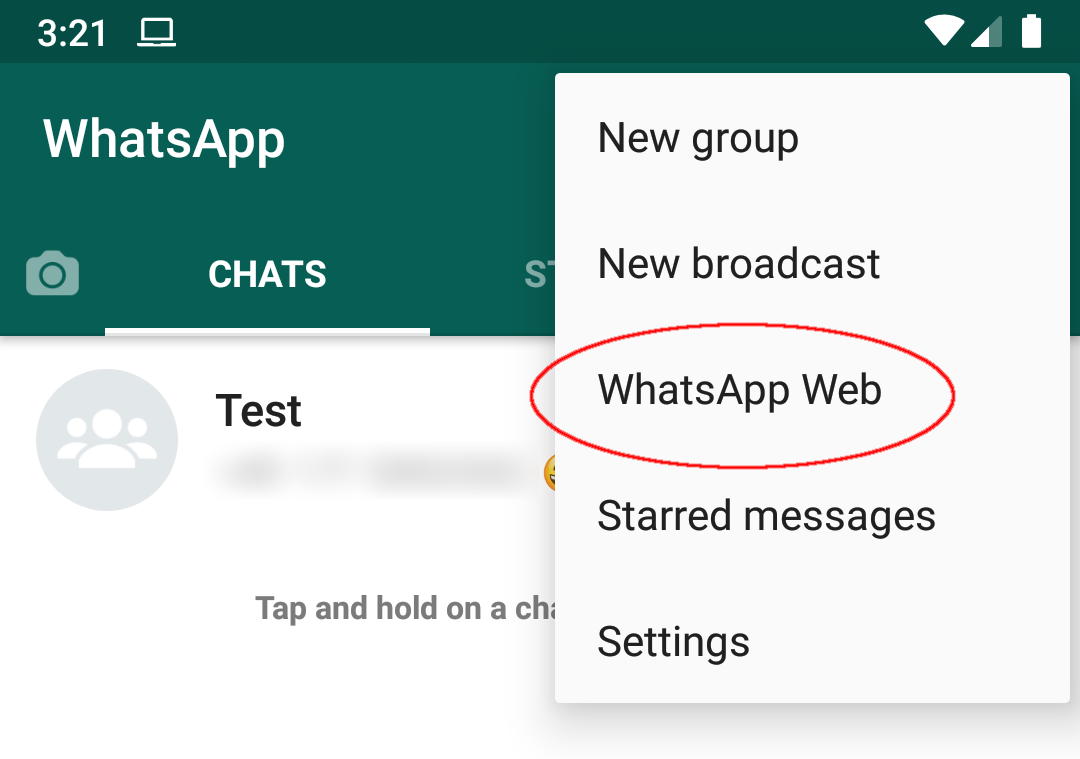
To setup a gateway between two protocols in matterbridge, you need to specify a channel for WA that should be bridged. The chat/group titles you see in WA won't work (e.g. from the screenshot above, "Test" won't work). Fortunately, matterbridge will complain about improper channel names and suggest the correct ones to you. In my case, it was a string of mainly numbers including the phone number of who created the group chat. Maybe there is a way to get this out of WA?
(Currently, the WA example config does not explain this at all; it doesn't even mention the gateway part.)
diff --git a/docs/protocols/whatsappmulti/settings.md b/docs/protocols/whatsappmulti/settings.md
index 5778318..882717c 100644
--- a/docs/protocols/whatsappmulti/settings.md
+++ b/docs/protocols/whatsappmulti/settings.md
@@ -275 +275 @@ until restarting matterbridge.
- Format: *string*
- Example:
```toml
- SessionFile="session-48111222333.gob"
+ SessionFile="/usr/share/matterbridge/session-48111222333.gob"
```
